Originally published at: Custom Devices – World Machine Development Blog
Another significant framework change is around how macro and code devices are handled. As mentioned in the kickoff, stuff that reads more like What’s New? should probably be written for the Help Center instead of here, but there’s a huge backlog of changes to write about and so some of that is just unavoidable. WIthout…
4 Likes
I would say “Yes, it makes sense to do so, but only if they are assigned a family”. If they have a badge, it would make it easy to know which are included vs which are custom.
I was about to point out how similar it was to Unity’s Compute Shaders (more directly).
I came by to check what was happening in WorldMachine Land and caught this post within minutes (Had that sixth sense)! I am happy to see custom devices are being integrated more fully. Is this a stepping stone to allowing users to release “protected devices”?
1 Like
yes - code devices can now be locked and private. The code source on disk is protected against casual tampering attempts.
Both code and macro devices can be redistributed by simply dropping the .dev device into the content library in the filesystem
1 Like
I agree! I just did a quick experiment publishing them to the toolbar as well and I think I like it:

Although I might have to also add the ability to hide items from the toolbar. (Right now, if you right click you can favorite; That could also have a hide option)
2 Likes
Why not make the toolbar fully customisable? Or allow people to make their own tabs/families? There are certain devices one almost never uses (file input for me for example), and being able to put non-native devices in the toolbar instead would be very nice in my opinion. Of course, there should be an option in the settings where one can easily revert to the default layout.
Oh well, this is probably a case of “simple idea, lots of work to implement”… 
Looking forward to the new version(s)!
4 Likes
With the badge system, what happens if multiple badges exist on a single device (eg. Favorite Device and Custom Device badges)?
YEEE
thats exactly what i did thinking about while reading
i’m your electorat,
i’m ready to vote for your idea
Since the post I’ve added the “Show custom devices in toolbar” and also “You can hide buttons that you don’t want to see”, and that helps for sure. As you noted @HYLK , the toolbar is meant to be a quick-access tool and not everything needs to be there.
The idea of fully custom tabs is an interesting one; it would take a moderate amount of work but I am not opposed to different sort orders - WM used to let you sort by packet type for example. I removed that in the LTE migration because it wasn’t as useful as I hoped, but I could see creating custom tabs on a toolbar that could be aligned for tasks for example (one tab for terrain creation, another for texturing, etc), and where a given action can be present on more than one tab. https://worldmachine.featureupvote.com/suggestions/701960/allow-custom-toolbar-categories
@PoshIndie, one badge per button, so if an action has both right now the favorite badge wins, as that seems more user relevant.. the “Library” badge is a hint that the item isn’t a built-in “written in C++” item, but as mentioned in the blog, that distinction is sometimes helpful but should be a low level concern.
2 Likes
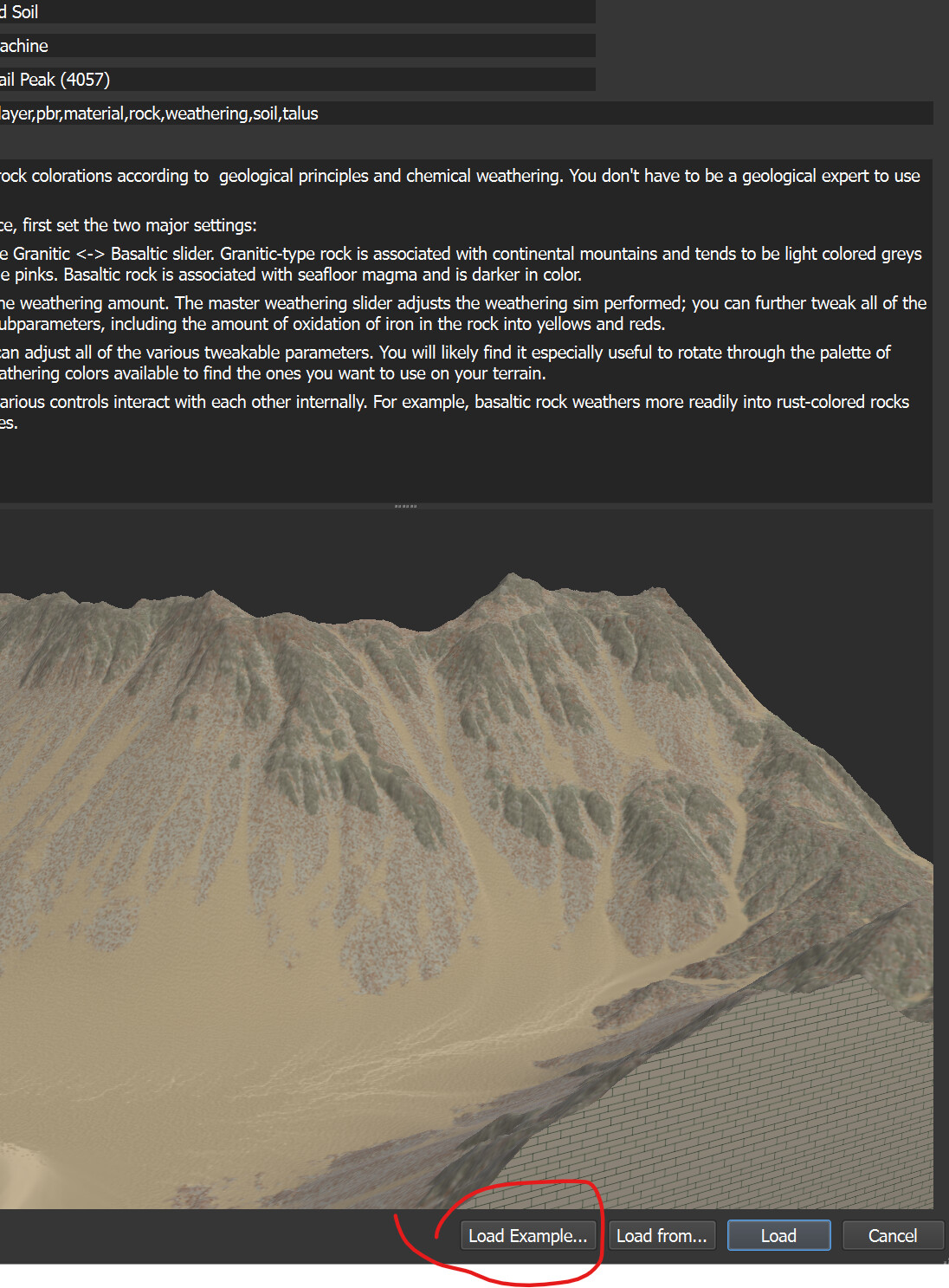
One other change I forgot to mention in the blog post: Custom devices can now have an example world attached to them, showing you how to use the particular device.
This is a personal favorite feature of mine. If you’ve ever tried to figure out exactly what the heck some author intended with all the various inputs and settings for a macro - this is designed to address that, by letting the creator show off how their device is supposed to be used in a complete world.
As a bonus, it also gives you a nice preview in the library.
4 Likes
There are a few observable differences.. Macros will tend to be less efficient than purpose-built devices, and GPU-based compute devices have a different set of memory restrictions and maximum grid sizes at play compared to CPU-based ones. But the point stands.
I have some insights on this. I believe the performance gap is largely due to the overhead of Macros still using nodes to proxy data transfer. Data frequently flows between memory and GPU memory, sometimes unnecessarily. For example, multiple operation steps can sometimes be logically merged (even into a same kernel function), but this is difficult to deduce from the node tree alone.
In contrast, Code allows the user to completely control the flow of data. However, everything comes at a cost; debugging Code can be painful, unlike Macros which allow observation of the results of arbitrary intermediate steps. From this perspective, Macros are more user-friendly.
A common design pattern is to encapsulate the entire custom device as a Macro, implementing only the most important/customizable parts as Code, as part of the Macro’s node tree. However, this approach doesn’t solve the problem of unnecessary data flow.
Ultimately, I believe WM should provide built-in algorithm APIs for Code, reducing unnecessary parameter passing and repetitive encoding. Furthermore, once the built-in node-to-code API mapping is established, does this mean that “compiling” the node tree into code becomes possible?
Okay, personally, I don’t really like having custom devices mixed into the built-in toolbar menu. Otherwise, as I collect more and more custom devices, I’m sure my menu bar will eventually exceed the screen’s width.
However, I think it would be better to let users decide which ones to display and which ones to hide. For example, they could check boxes in the library to see which ones to display, or assign families in the library, or even create custom families and decide whether to hide a particular family entirely, etc.
5 Likes
Will there be an option to downgrade to earlyer verion of macros also?
yes - It will work exactly like current devices, where you can right-click and select prior versions if necessary from the menu.
2 Likes
I like the idea of allowing for fully custom toolbars that both you and @HYLK have brought up, but that’s definitely one step further featurewise.
after a few iterations, right now, you can hide any icons you don’t want in the toolbars, and there’s also a config toggle to prevent library content from being presented there in the first place.
2 Likes