I’m on the cutting edge and have installed version 4059 Dragontail Peak (World Machine Current) in parallel with the World Machine Professional Install of 4051 Hurricane Ridge.
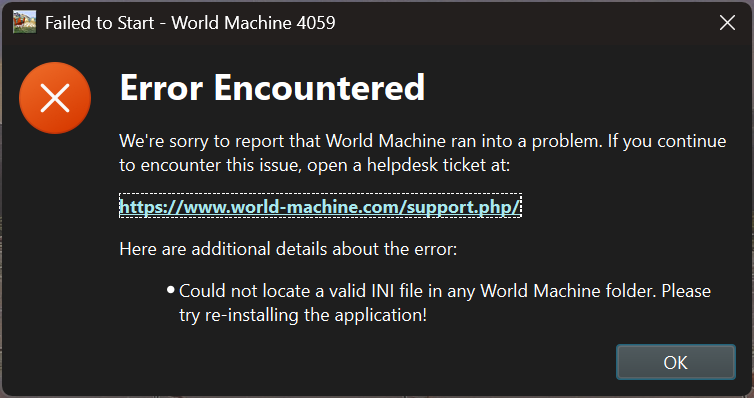
When I run the program after installing, I get the following popup, claiming I do not have a valid INI file in any World Machine folder. I’ve tried reinstalling already.
I have a world.ini file in AppData/Roaming/World Machine Release that was written/works with 4051, but no others that I can find (other than the generic ones in the install folders).
Thanks for the bug report! I suspect there may be a problem for a first-run situation. I am investigating and will post here when it is resolved - you will need to re-download the installer
I’ve resolved the issue - there was a problem on a true fresh install, that didn’t surface in my testing.
I had suspended availability until I resolved this issue - it should be available again. @rsalvatore you will need to re-download 4059 to access the fix.
Hello Stephen, I am not able to get WM 4059 running on my computer. Yesterday was my first attempt and when the app crashed, I admitted to the option that the crash report would be sent to you.
Today, I did every step that I could think of to remedy the issue:
Uninstallation of WM 4059, restart of Computer, redownloaded the software, reinstalled it = same crash as before.
Pratyaksh Gaur gave me some advice on the Facebook page and I repaired all vc++ 2013 and 2015-2022 versions = WM 4059 crashes.
Reinstalled WM 4059 in the default folder that is defined by the installer = crash
Uninstalled all previous WM versions and wiped WM license data in Windows = crash
Previous WM versions run without issues (for example 4020 and 4051 and older ones too). Computer is an Intel Xeon 2687w V4 with 12 cores, 128 GB RAM, RTX 3060 12GB and Windows 10 Pro.
I am out of more options to troubleshoot this issue. Hopefully there is some solution at hand.
I actually just sent you an email about your crash report a moment ago.
The short version for anyone else running into a startup crash - try temporarily renaming your Macros folder under World Machine Documents - WM parses and loads all custom devices on startup, and a crash there prevents WM from starting. You can also launch WM4059+ with the “–minimal” flag which will skip loading your content library.
I’m going to add a safeguard in the next version that detects a startup crash and temporarily avoids parsing the user content to help diagnose things like this.
Not that there was any doubt about your genius, but you solved this annoying issue.
Thank you so much for your quick and decisive response. I changed the file ending of the culprit macro from *.dev to *.x and this allowed indeed to start WM 4059 correctly and I was able to licence it.
If I am not completely wrong, this macro was downloaded from the user macro section of World Machine website. (I have sent it to you via my email response).
Looking forward to enjoy your new groundbreaking VDM features, which might put other commercial heightfield creation software developers in a weak spot.