Would it be possible to get a standalone Transform Node that allows scaling/rotating/translating the input?
Things I would like to have:
- When scaled, allow the user to specify what happens with the surrounding area between thinks like “Extend Edge”, “Zero”, or “Nothing”. This would allow scaling something and rotating/moving it where it would only have impact in the area (For localspace scattering, for instance).
- When scaling, you should be able to choose to svale the height by the same amount.
When I tried doing this before, I struggled to get it to behave the way I wanted, and it required importing a heightmap file, changing the parameters in the file device (size, offset, etc), and trimming it manually with other devices. This seemed a clunky, so maybe I am just missing the right way to do it currently? I could not find a simple “Transform”-like device, though.
2 Likes
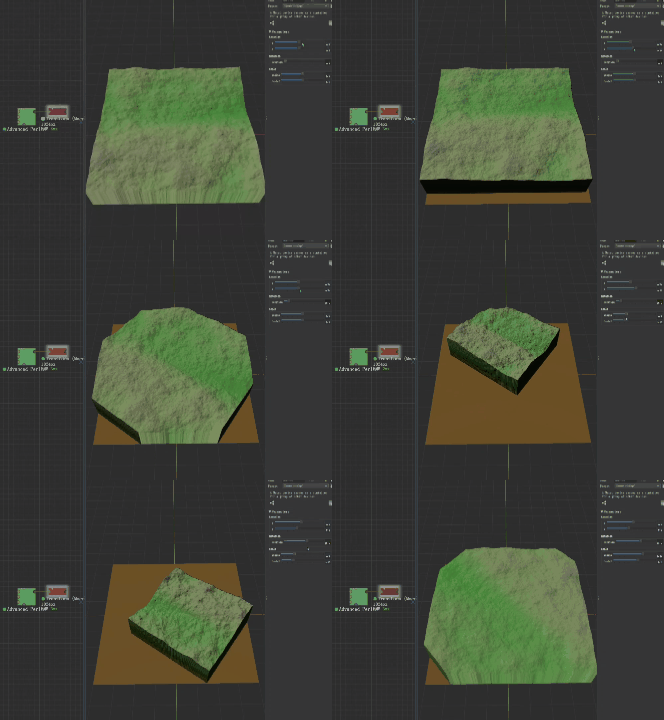
I learned the code for image transformations, maybe this is the feature you want
4 Likes
That is actually exactly what I was after. What device is that, or do you mean you used the code device to achieve it? The code device was my original thought, but figured it would make more sense as a core device.
3 Likes
At a glance, I’d guess it is a code device implementation.
Your request is sort of tangent to my wish for a proper Lookup device, since I know a lot of transform hacks using one. I use them a lot in Filter Forge for remapping, transforming and distorting/displacing textures. I end up doing a lot of import/export swapping between WM and FF to complete many of my projects (the tool I want is always in the other app from the one I’m using).
1 Like
If you are willing to work in Localspace for your input, you can do all of the above using the Instance Tiling device to place it (Translate / Scale / Rotate).
5 Likes