Hi, mates!
I’m trying to achieve an automated batch process for multiple sattelite .tif texture files. The idea of the WM graph is to process the input image with nodes like “Select Color”, “Blur”, “Bias/Gain” etc., to get different grayscale textures (Bitmap Output node) that will be used as Landscape Layer Materials in Unreal Engine 5.
From what I saw, Automation Variable node only supports Float data type. I’m looking for the way of changing the “Filename” (path to the file) field in the “File Input” node. Any suggestions?
hiiiiii
me also did have relatively same idea in the past
i did try a lot of stuff
even did try to write xml scripts
but as i remember - here is no build-in way to work with text and process it somehow to build, for example, - file paths
maybe i’m wrong and other guys may say something useful
but as i quick answer - no, here is no way to build text, process it and etc, - but i wish it to be implemented one day
Thanks for the reply!
I even tried to open the world .tmd file with Notepad and manually edit the path to the texture as a really dirty workaround, yet it failed to open the .tmd file overall after such manual changes
i also was thinking about doing the same,
but i did not try - i’ve seen somewhere that editing internal WM project/code structure might conflict with the license agreement
so i got scared to even touch it
There is no way currently to fetch the root path, or to create a file path, programmatically in World Machine. I made a topic about this exact problem in the super secret inner circle, back in July. There has been some vague, scattered interest. Don’t know yet if anything will come off of it. So thanks for posting a discussion about it on the open forums, now I feel better knowing that I’m not alone fiddling with this idea.
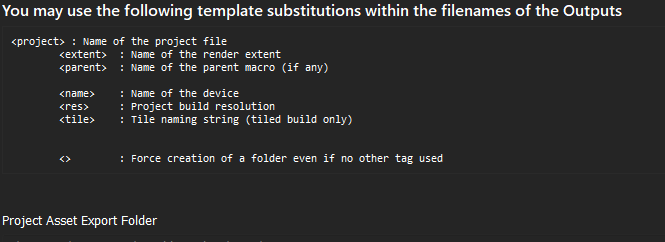
Fix you root project path, for your template.tmd. Everything you do within World-Machine assumes that wherever the project file is saved on disk, is the root path. If then you set relative paths within your nodes (like “\Builds”), you can save your exports in a subfolder. May have to create those subfolders manually though, on per project basis. You can use xml tags instead of file names in your template project, so that filenames take up your per project details to craft unique names. Here’s your tag list - Screenshotted from the “Export Terrain Assets” dialog, from the menu “File, Export Terrain files”
is that possible to read that post? or is it hiden category on WM forum for alpha testers?
i’m okey that i’m can not access it - just curious how that works
@Tomatiy It’s a very rough idea (unformed thoughts) not ready for open discussion, that’s why I shared it with a small group of people. About the rest, mum’s the word..!!
Just a note that the next version allows importing a string for filenames from the automation scalar, as well as has a template tag for the filesystem.