I’m looking to buy World Machine for a project I’m working on and for later projects down the line. I’ve played about with the free version which obviously has a lot of restrictions.
The project I’m currently working on is a mod for the game Kenshi, which currently requires a map size that comes out to I believe a 64x64 tile set generated by World Machine free. That’s naturally very time consuming, especially considering its not just one export that needs to be stitched together and I will not see any errors until the entire thing is completed. So free version is nice for getting to grips with the software but not for making usable outputs.
The purchase page shows that the Professional edition comes with an unlimited resolution. The Indie version states that build resolution is limited by system RAM. Can anyone explain to me what the Indie version’s resolution limitation is? Is it an unlimited so long as my resources can handle it?
Thanks for the quick reply. I’m unsure if the game would support tiled builds as it appears the map data is in single images to begin with. Tiled would be exceedingly useful for my own projects later down the line though so professional seems the way to go when I have the funds.
Do you have a general idea of the RAM usage for a 64x64 tiled map? Or is it going to vary based on the nodes used?
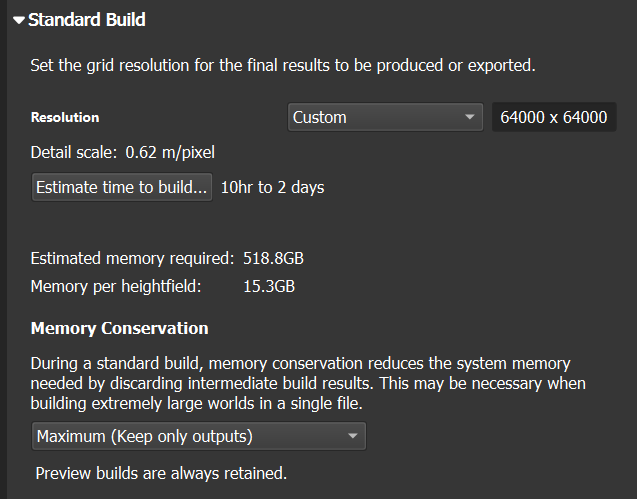
Also need to notice, that “memory per heightfield” means RAM that needed only per one image. If your node have 10 inputs with 10 images - it will need to load all of them at ones to RAM to start processing itself - at those cases even paging data to disk did not help me
(ignore “Estimated Memory required” because i did put number in not empty project)
On my phone at work but the stats I’m seeing from a quick Google search suggests the map format is 16k +1 set to 32k squared in resolution. Apparently this is the highest settings possible with WM but I can’t say when this guide was written.
I’ve got 32 gigs of memory so 15 isn’t world ending. I’m working with a single height map image at the moment, does this factor in things like using different nodes for erosion and such?
WM have no limits in resolution, as i know, - you may just set resolution to “Custom” and type any value
Type of node do not impact RAM size, type of node impact only the time of calculation. “Natural tab” nodes one of most long to calculate
Node impact RAM size, if at one moment you have connected more than 1 image input (what you will have quite often due to usage of Mask input, or Spatial Types)
@Stephen i may do mistakes and be wrong, so maybe they need your guide on how nodes impact RAM usage
I do think node type impacts RAM size, as some nodes have multiple passes going in at the same time, but maybe @Stephen can shed some light on that.
32 GB is okay for 8K res, but gets nifty if you do a lot of parallel stuff. That means you must serialise your process, and work with checkpoints to ensure you limit the time of RAM needed at one moment. Serialisation is most often not a big issue, but it reduces flexibility and, more importantly, impacts the iterative nature of the process (especially when using checkpoints).
For a 16K map, 64 GB is the bare minimum I’d say, but to be comfy get 128 GB of RAM.
Alternatively, get yourself a cheap SSD which you can use as a scratch disk. This will severely impact render time, but is a lot cheaper than buying 128 GB of RAM.
As for tiled building, that comes with its own host of issues, mainly when you rely on devices that need “context”, such as the water devices and erosion nodes.
Lastly, if I recall correctly, Indie limits you to 4 build threads (or was it CPU cores), which will impact render time. That said, when building at 8K with 32 GB of RAM, you can’t afford building more than 2 devices at once.
Complicated devices such as erosion need to keep many maps in memory at once to function, and this increases if you provide input spatial parameter maps and such. I would ballpark at least 10-15x the size of a single memory buffer (the figure listed in “Memory per heightfield” in project settings).
Consequently, 64,000 x 64,000 would require a huge amount of memory to process - at least 256GB of system RAM available. 32k resolution is achievable with 64gb of RAM, and 16k should fit within ~16GB of ram. Those ballpark figures are for a final build only. There’s a reason the tiled building process exists
As far as I can tell the output I require is only 16k x 16k, so not quite hitting that 256GB cap just yet haha. Although I did once upon a time have ideas to make a globe-spanning RTS, I mean like real world sizing, so that would be a fun trial to see how far this software could be pushed.
Anyways, I found a free alternative, or at least the trial is that kind of “unrestricted but time-limited”, its enough for my purposes for now but the layout is very clunky and is probably taking most of the time I have just trying to figure out where things are. I’ll definitely be giving World Machine indie a go once I have cash to buy it because it just seems like the better option by far.